Suggestions
The internal links to add: which page, which passage, which anchor text.
What a suggestion is
A suggestion is a place to add an internal link: a sentence on one page (the source) that should link to another page (the target) and does not yet. Suggestions are found in two steps. First every sentence of your articles is compared with the title of every page by meaning, not only by shared words: each page gets the sentences that talk about it most closely, one per article, and each article the pages its sentences come closest to. This needs no existing links, so it works on a new site too. Then an AI check reads each sentence and page: would a link from this sentence be a useful next step for the reader? If it is sure it would, it picks the words in the sentence to link and the link's role for the reader. Pairs it is unsure about are left out.
The AI check's answers are kept, so a re-analysis asks only about pages whose text changed and gives the same list for the rest. Product pages are not suggested as targets: an article's general words (a steel, a knife type) name a whole series, not one product. Their categories are. A sentence that appears on more than one page, such as an article's teaser on an archive page, is never a place for a link.
The list is ordered by target. Each card is one page that could use a link, with the places on other pages to add it. Pages nothing links to come first, then pages only the navigation reaches.
Why a page needs a link
Each target is filed under its strongest reason, so the counts in the rail add up to All:
- No inbound links
- Nothing on the site links to the page. A link makes it discoverable.
- Navigation only
- Reached only through the menu or footer, never from the text of another page.
- Below average
- Fewer in-content inbound links than the average page of this site.
- Back to hub
- The page does not link back to the hub page of its own topic, not even from the menu or footer.
- Deep pages
- More than three clicks from the start page, or with no click path at all.
- Authority
- A page with at least twice the target's PageRank could pass some of it on.
- Other
- The source and target are simply about the same thing, with none of the reasons above.
What a link does for the reader
A chip on each card and each place names the role the AI check gave the link:
- definition
- The target explains a term the sentence uses.
- deeper dive
- The target treats what the sentence talks about in more depth.
- comparison
- The target helps the reader compare options the sentence mentions.
- next step
- The target is what the reader can do or read next.
Adding a link
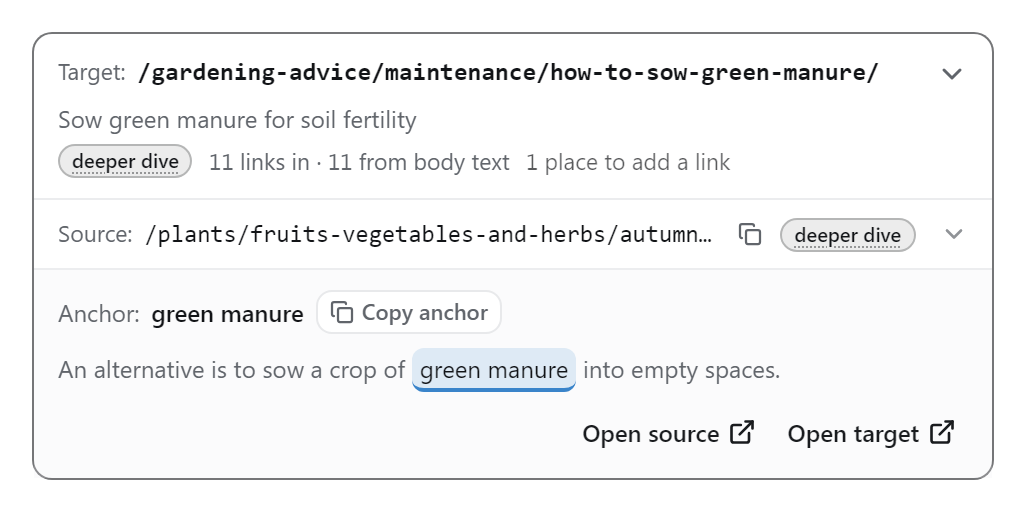
- Open a card. It lists the source pages, surest match first; open one to see the details.
- Section names the heading the passage sits under, so you can find it on the page.
- The proposed anchor text is shown in quotes. in the text means the phrase already appears in the passage and only needs to become a link. Every suggestion is in the text: a link whose words are not on the page is not suggested, so the snippet can write each one you approve.
- The excerpt shows the passage with the anchor highlighted. Open source and Open target open both pages on your site.
- Approve the link to keep it, or Dismiss it. Approved links are listed under Your links, and the link snippet can put them live on your site. See Your links & the snippet.
Opening a place frames the two pages on the graph. A crawl makes at most 10 suggestions per source page and 15 per target, so no page is flooded with new links.
Narrowing the list
- The reason filters in the rail.
- The search box, which matches source and target URLs and titles.
- Source and Target limit either end to a topic or folder. From a Groups card you can open the suggestions that stay inside that group.
- The directory filter in the header, like every view.
CSV exports the list as filtered, one row per place to add a link, with the section, anchor and excerpt.
Rules: pages to leave out
Some pages are no place for an editorial link (a legal page, a tag archive), and some should not be linked from text. The Rules panel above the list holds those exclusions. A rule is a directory such as /tag/ or a regular expression such as ^/(de|en)/legal/, with two switches:
- as source: never suggest adding a link on these pages.
- as target: never suggest linking to these pages from body text.
The crawl adds rules by itself for folders that are plainly no place for an editorial link: a folder whose name says what it holds (products, tags, legal pages), a folder whose pages are almost all reached only through navigation and listings, like a catalogue, and root pages such as the privacy policy or shipping terms. They show in the panel as applied by the crawl, each with a switch. On a crawl made before a rule existed, it is offered as a proposal instead, with how many suggestions it would remove; Accept or Dismiss it.
Rules belong to the project, so they carry over to its next crawls. A rule switched off is remembered and not added again. A project holds up to 50 rules.
What is never suggested
- A link the source page already has in its content.
- A link you approved or dismissed before.
- Pages with too little text of their own (under about 100 words).
- Sentences that appear on more than one page: teasers, banners, calls to action.
- Search result pages, paginated listings, the cart and legal pages, as source or target.
- Links between near-duplicate pages, which point at the same content.
- Links between pages in different languages.