Groups
The site as topics and folders, and how links flow between them.
Two ways to group a site
The Groups view shows the site as sets of pages that belong together, in two ways you switch between in the rail:
- Topics
- The groups your site defines itself: a category, index or overview page and the pages it lists, named after that page's own heading.
- Folders
- The top-level folders in your URLs: how the site is organised, to compare with the topics.
The graph colours pages by the grouping you have open, so you can see whether each group sits together or is spread across the site.
How topics are found
A hub is a page that links to at least five other pages from its main content (the start page never counts, and a listing's later pages count as part of it). Each hub and the pages it lists form a topic. A hub left with fewer than four pages does not become a topic.
When several hubs list the same page, its content decides which topic it joins. A page no hub lists joins the topic it reads most like, if it is close enough; the rest are grouped by URL or by content where they form clear groups, or stay under No topic.
Reading a group card
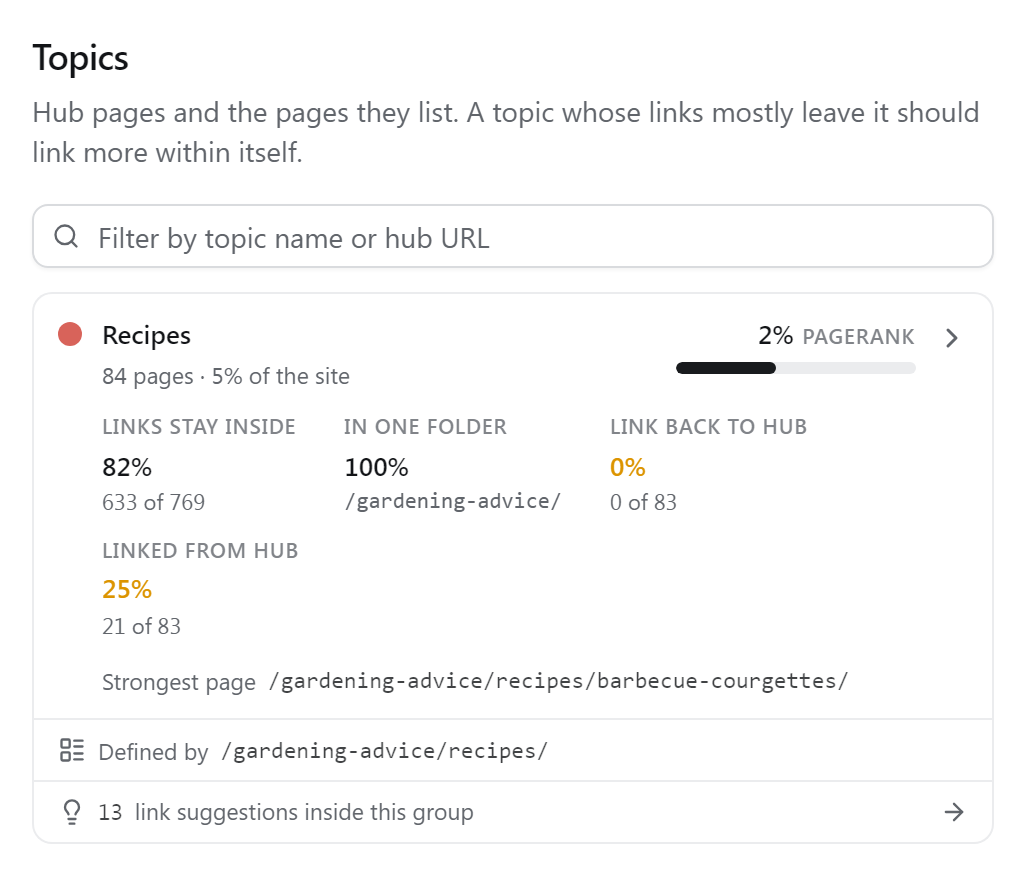
- Pages
- How many pages the group holds, and their share of the site.
- PageRank
- The share of the site's internal PageRank its pages hold. The bar is relative to the strongest group.
- Links stay inside
- Of the links from this group's pages (navigation and other boilerplate left out), the share that points to another page of the same group.
- In one folder
- The share of the group's pages that sit in its most common folder.
- Link back to hub
- Topics only: the share of its pages that link back to the hub from anywhere but the sitewide navigation. In a well-built section, every page links back to its parent.
- Linked from hub
- Topics only: the share of its pages the hub links to from its own content.
- Strongest page
- The group's page with the most PageRank, when it is not the hub itself.
- Defined by
- The hub page that lists this topic. Click it to open its details.
The two hub figures turn amber below 50%. Open a card to focus the group on the graph (the rest fades, and links crossing its boundary are drawn lighter) and to list its pages, strongest first.
What to look for
A topic whose links mostly leave it is a set of pages that should link to each other more. A card with link suggestions inside the group says N link suggestions inside this group: places where one of its pages should link to another and does not yet. Click it to open Suggestions with both ends set to this group.
Comparing folders with topics shows where your URL structure and your linking disagree: a folder whose links mostly leave it is not working as a section.